The Plustek OpticFilm 8100 and 8200i are the same 7200 dpi 35mm film scanner at heart. The difference that matters is an infrared channel. The 8200i has one, so SilverFast’s iSRD can find dust and scratches during the scan and remove them. The 8100 doesn’t, so every speck on the film ends up in your file.
So the real question isn’t which scanner is sharper. It’s how you want to deal with dust.
The short answer
- Buy the 8200i if you scan a lot of color negatives or slides and want dust handled at scan time.
- The 8100 is enough if you mostly scan traditional black-and-white film (infrared can’t help there), or your film is fairly clean.
- Either way, software can remove dust after the scan. That matters most if you have Kodachrome or traditional black-and-white film, you camera-scan as well, or you’ve already scanned without infrared.
Specs side by side
| OpticFilm 8100 | OpticFilm 8200i SE | OpticFilm 8200i Ai | |
|---|---|---|---|
| Optical resolution | 7200 dpi | 7200 dpi | 7200 dpi |
| Infrared channel | No | Yes | Yes |
| iSRD infrared dust removal | No | Yes | Yes |
| Bundled software | SilverFast SE Plus | SilverFast SE Plus | SilverFast Ai Studio + IT8 target |
Both models share the same optics, so don’t pay extra for the 8200i expecting sharper scans. Independent testing has measured real-world resolution well below the 7200 dpi headline on this scanner family (filmscanner.info measured about 3800 ppi on the 8100). The extra money buys the infrared channel, nothing else.
What infrared dust removal does, and where it stops
The infrared pass sees through color film dyes but not through dust, so the scanner gets a map of defects to fill. It works well on:
- Color negatives (C-41)
- Color slides (E-6)
- Chromogenic black-and-white film such as Ilford XP2 or Kodak BW400CN
It has two well-known limits:
- Traditional silver black-and-white film. The silver in the image blocks infrared, so the defect map is useless. LaserSoft says so on its iSRD page and recommends software dust removal instead.
- Kodachrome. The dense emulsion makes infrared detection harder. SilverFast has a Kodachrome-optimized iSRD mode, but results vary, and Nikon warned that infrared cleaning on Kodachrome can soften detail on some of its scanners. See our Kodachrome dust removal guide.
More background: What is Digital ICE? A plain-English explanation.
The third option: the 8100 plus software
If you buy the 8100, or already own one, dust removal moves to after the scan. You have three routes:
- SilverFast’s software dust removal. Worth trying first if you already use SilverFast.
- Healing by hand in Photoshop or Lightroom. Fine for a few favorites, slow for a whole roll.
- Batch dust removal with DustMagic. Point it at a folder of scans and it cleans them all in one go.

DustMagic works on the TIFF or JPEG files your scanner software saves. Choose dark or light dust, check what it found in the red Detection Overlay, then click Process Batch. It writes cleaned copies to a cleaned subfolder and never touches your originals. It handles any film scan, including Kodachrome and traditional silver black-and-white, which infrared can’t clean.
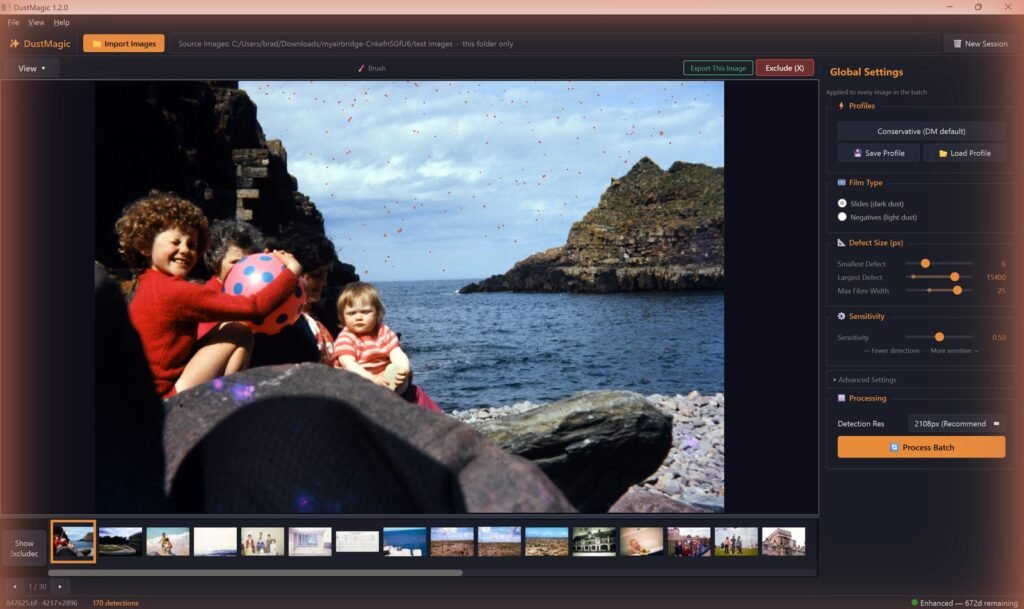
One tip for scanner users: DustMagic is tuned first for camera scans, which are very sharp. If small specks are being missed on softer scanner files, turn off Focus-Based Filtering in Advanced Settings (troubleshooting guide).
Which should you buy?
| If you… | Choose |
|---|---|
| Scan lots of color film and want dust gone at scan time | 8200i SE |
| Want IT8 color calibration and SilverFast’s full toolset | 8200i Ai |
| Mostly scan traditional black-and-white film | 8100 |
| Have Kodachrome, or also scan with a camera | Either, plus software dust removal |
| Want to spend less on hardware and clean in batches later | 8100 + DustMagic |
FAQ
Is the 8200i sharper than the 8100?
No. Both are 7200 dpi scanners with the same specifications. The 8200i adds an infrared channel for dust and scratch removal.
Does iSRD work on black-and-white film?
Only on chromogenic (C-41) black-and-white film such as Ilford XP2. Traditional silver films like HP5 or Tri-X block infrared, so iSRD can’t map the dust.
Can I add infrared dust removal to the 8100 later?
No. Infrared is hardware. On the 8100 your options are software: SilverFast’s dust removal, healing tools in your editor, or batch removal with DustMagic.
Does DustMagic work with SilverFast or VueScan scans?
Yes. Save TIFF (16-bit if you can) or JPEG and open the folder in DustMagic. Turn off your scanner software’s own dust removal so the two tools don’t compete. If you’re still choosing scanning software, see VueScan vs SilverFast.
Try it on your own scans
The free trial processes unlimited images, full batches included, with a watermark on the output. If you like the results, a 12-month license ($59) removes the watermark. Windows and Mac.