VueScan and SilverFast are the two big names in film scanning software. Both can drive dedicated film scanners and flatbeds, and both can use a scanner’s infrared channel to remove dust. They’re built on different ideas, though, and the licensing is very different.
The short answer
- Choose VueScan if you have an older scanner without current drivers, use more than one scanner, or work on Linux. One license covers any scanner.
- Choose SilverFast if your scanner is on its supported list and you want film-specific tools such as NegaFix profiles and, in Ai Studio, IT8 calibration. If your scanner came with SilverFast, try that first.
- For dust, both rely on your scanner’s infrared channel. If your scanner doesn’t have one, or you shoot Kodachrome or silver black-and-white, you’ll need another approach.
Side by side
| VueScan | SilverFast | |
|---|---|---|
| Maker | Hamrick Software | LaserSoft Imaging |
| Scanner support | 8,000+ scanners from 42 manufacturers (Hamrick’s figure) | A list of supported models |
| Platforms | Windows, macOS, Linux | Windows, macOS |
| Edition you need for film | Professional (Hamrick’s FAQ says it’s required for film and slide scanners) | SE, SE Plus or Ai Studio |
| List price (US) | Professional $229.95 one-time (subscriptions also available) | SE $49, SE Plus $99, Ai Studio $249 |
| License | Up to 4 of your own computers, any number of scanners. One-time purchase includes 1 year of updates | Tied to one scanner model (up to two model changes for purchased licenses, none for licenses bundled with a scanner) |
| Infrared dust removal | Infrared clean (needs an IR scanner, color film only) | iSRD in SE Plus and Ai Studio (needs an IR scanner) |
Where each one is stronger
VueScan
- Keeps old scanners alive when the manufacturer’s software no longer runs on a current OS.
- One license follows you across scanners and computers, including Linux.
- Simpler licensing. Buy once, and updates are included for a year.
SilverFast
- Deep, film-focused controls, including NegaFix negative profiles.
- Ai Studio adds IT8 calibration for accurate color. The Plustek 8200i Ai bundles an IT8 target.
- Includes software dust removal, useful when your scanner has no infrared channel.
- Bundled with Plustek film scanners (and some others), so you may already own it.
What neither can do about dust
Infrared cleaning is the best thing either program offers for dust, but it has hard limits:
- No infrared channel, no infrared cleaning. The Plustek OpticFilm 8100, budget slide scanners and every camera-scanning setup lack one. See Plustek 8100 vs 8200i.
- Silver black-and-white film blocks infrared. VueScan only offers Infrared clean for color film (Hamrick docs), and LaserSoft says infrared can’t get through the silver layer (LaserSoft).
- Kodachrome is hit-and-miss. SilverFast has a Kodachrome-optimized iSRD mode, but the dense emulsion makes detection harder and results vary by scanner. See Kodachrome dust removal.
Without infrared, the options are SilverFast’s own software dust removal (if you use SilverFast), healing tools in your editor, or batch dust removal after the scan.
DustMagic works alongside either
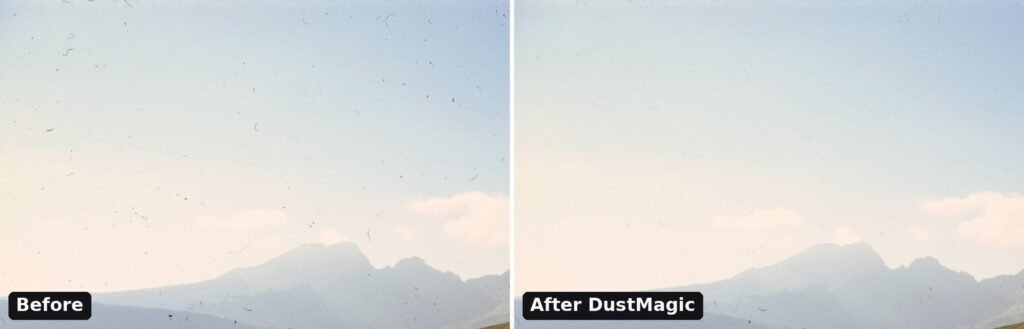
DustMagic doesn’t replace your scanning software. It picks up after it. Scan to 16-bit TIFF (JPEG works too), turn off the scanner software’s own dust removal so the two tools don’t compete, and open the folder in DustMagic. You choose whether the dust looks dark or light, and it shows you everything it found in a red overlay, and cleans the whole folder in one pass. Cleaned copies go to a cleaned subfolder and your originals stay untouched.
It covers any film scan, including Kodachrome and traditional silver black-and-white, the films infrared struggles with. More on scanning and cleaning slides: How to scan slide film.
FAQ
Is VueScan better than SilverFast?
It depends on your setup. VueScan wins on flexibility (many scanners, older hardware, Linux, simpler license). SilverFast wins on film-specific depth if your scanner is supported, and you may already have it bundled.
Do I need VueScan Professional to scan film?
Hamrick’s FAQ says Professional is required for film and slide scanners (source).
Can I move a SilverFast license to a new scanner?
SilverFast licenses are tied to a scanner model. LaserSoft’s terms allow up to two model changes for purchased licenses, but not for licenses bundled with a scanner (terms).
Which removes dust better?
With infrared hardware, both use the scanner’s IR channel, so results depend mostly on the scanner. Without infrared, neither can do infrared cleaning, and you need software dust removal after the scan.
Try it on your own scans
The free trial processes unlimited images, full batches included, with a watermark on the output. If you like the results, a 12-month license ($59) removes the watermark. Windows and Mac.
Sources (checked September 2026)
- Hamrick: VueScan
- Hamrick: VueScan options by edition
- Hamrick: VueScan pricing
- Hamrick: Infrared clean (color film only)
- LaserSoft: SilverFast for Plustek scanners (editions and prices)
- LaserSoft: SilverFast 9 version comparison (PDF)
- LaserSoft: terms and conditions (license per scanner model)
- LaserSoft: iSRD infrared dust removal