If you’ve looked for a way to clean dust from film scans without an infrared scanner, you’ve probably found SRDx. It’s LaserSoft Imaging’s “Smart Removal of Defects” plug-in for Photoshop. It’s a capable tool: adjustable automatic detection, careful manual controls, and correction that keeps the original sharp.
But SRDx is built to work inside Photoshop. If your dust problem is a folder of scans rather than a single image, there’s a faster way. Here’s a fair comparison. The two tools solve the same problem for quite different workflows.
The short answer
- Stick with SRDx if you work image by image in Photoshop and want manual control over every correction.
- Choose DustMagic if you scan film in volume, including Kodachrome and black-and-white, especially with a camera, and want a whole folder cleaned with every change visible before you trust it. You can run it from Photoshop too.
What SRDx is
SRDx is a plug-in for Photoshop and Photoshop Elements on macOS and Windows (64-bit). LaserSoft’s published requirements list Photoshop CS5.5 through CC 2023 and Elements 13 through 2023 (system requirements). It’s sold separately and runs inside Photoshop, not in Lightroom or on its own.
It combines automatic detection of dust and scratches with manual tools to add what was missed and protect areas you want left alone. It uses your graphics card to keep corrections fast.
What DustMagic does differently
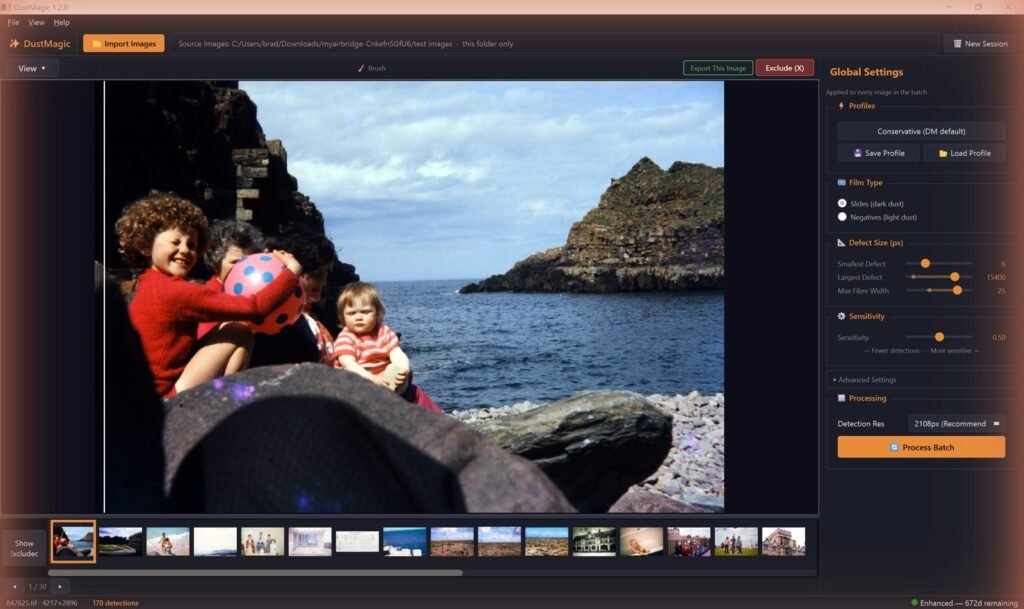
DustMagic is a standalone app for macOS and Windows. It also installs a Lightroom Classic plugin and a Photoshop script, so you can clean from inside either editor. Instead of working inside an editor, you point it at a folder of scans, choose dark or light dust, and let it work through the batch.
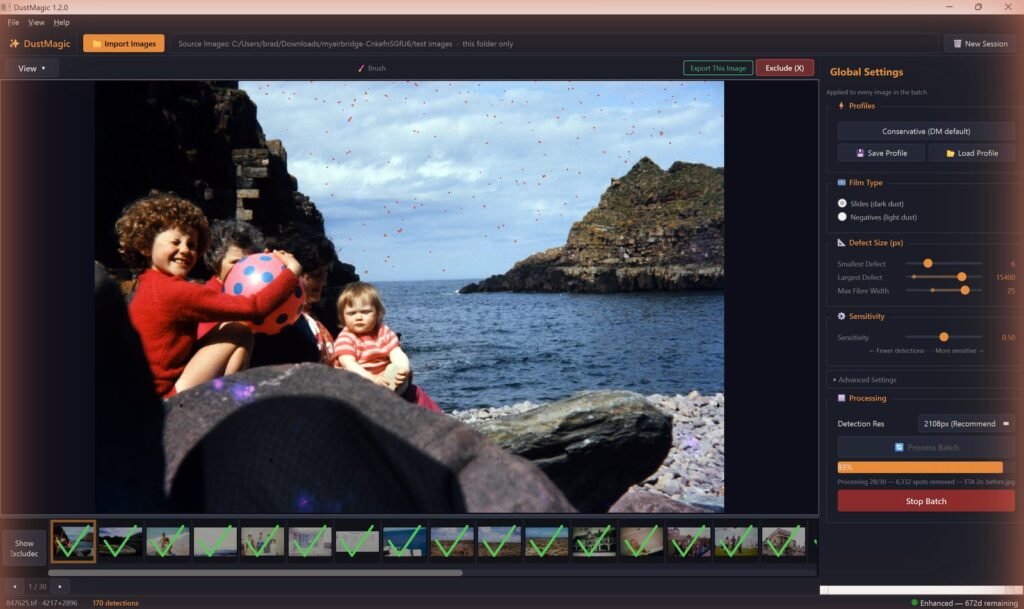
Every image gets a detection mask you can inspect in the app, with overlay, split view, Mask Only and zoom up to 20×. You can see exactly which pixels will change before you trust a batch. Detection is grain-preserving: it removes surface contamination, not film texture. For the odd stubborn spot, the Smart Brush Tool fixes it without leaving the app. Everything runs offline, so your images never leave your computer.
Batch cleaning inside Photoshop
If you’d rather stay in Photoshop, you can. DustMagic comes with a Photoshop script, DustMagic Batch, under File → Automate. It cleans the open image, or every open image in one go, and adds the result as a new layer, so your edits and layers stay intact.
It also records into Photoshop actions. Run the action with File → Automate → Batch and Photoshop cleans a whole folder unattended, layered PSD files included, saving each one back with its layers. Setup and settings: Photoshop batch cleaning, actions and layers.
SRDx vs DustMagic at a glance
| SRDx | DustMagic | |
|---|---|---|
| Runs as | Photoshop / Photoshop Elements plug-in | Standalone app (macOS and Windows), with a Lightroom Classic plugin and a Photoshop script |
| Requires Photoshop | Yes (listed support: CS5.5 to CC 2023, Elements 13 to 2023) | No (a Photoshop script is included if you want it) |
| Workflow | Inside Photoshop | Batch: a whole folder in one pass, in the app, Lightroom Classic or Photoshop |
| Film types | Color and black-and-white film scans | Any film scan, including Kodachrome and black-and-white; dark or light dust |
| Detection | Adjustable automatic detection plus manual marking | Automatic detection of dark dust, light dust or both |
| Touch-ups | Manual defect marking and protection tools | Smart Brush Tool |
| Formats | Whatever Photoshop opens | JPEG, TIFF (8-bit and 16-bit); layered PSD files through the Photoshop script |
| Trial | Demo version available | Unlimited images, watermarked output |
The infrared gap
Both tools exist because infrared cleaning (Digital ICE, iSRD) doesn’t always work. It needs a dedicated film scanner with an infrared channel, so camera scans are ruled out. It can’t see through traditional silver black-and-white film. And it’s unreliable on Kodachrome, where the dense emulsion makes detection harder and some scanners soften detail. More in What is Digital ICE? and our Kodachrome dust removal guide.
Where DustMagic fits
DustMagic is built for volume: any film, including Kodachrome and black-and-white, scanned in batches, especially camera scanning, where there’s no infrared option at all (see cleaning scanned film). Instead of spotting each image in an editor, you run the folder, check the masks, and touch up the rare miss with the Smart Brush Tool. If your dust problem is measured in folders rather than images, that’s the job DustMagic was built for.
FAQ
Does SRDx work in Lightroom?
No. SRDx is a Photoshop and Photoshop Elements plug-in. DustMagic includes a Lightroom Classic plugin that sends photos to DustMagic and returns cleaned copies to your catalog.
Can DustMagic work inside Photoshop?
Yes. DustMagic includes a Photoshop script (File → Automate → DustMagic Batch…) that cleans the open image or all open images and returns the result as a new layer. It also works in Photoshop actions, so File → Automate → Batch can clean a whole folder. The script needs the DustMagic app installed, which does the cleaning. See Photoshop batch cleaning, actions and layers.
Can DustMagic clean black-and-white film?
Yes. Chromogenic black-and-white (Ilford XP2, Kodak BW400CN) and traditional silver black-and-white (HP5, Tri-X, Delta, FP4) both work.
Do I need an infrared scanner?
No. DustMagic works on ordinary TIFF or JPEG scans from any scanner or camera.
Try it on your own scans
The free trial processes unlimited images, full batches included, with a watermark on the output. If you like the results, a 12-month license ($59) removes the watermark. Windows and Mac.