Symptom-first troubleshooting. Find the description that matches what you’re seeing, work down the fix list.
Real Dust Is Being Missed
- Confirm dark or light dust (the Film Type box) matches how the dust looks: Slides (dark dust) for dark specks, Negatives (light dust) for light ones. Wrong setting = the detector looks for the opposite tonal sign.
- Nudge Sensitivity to the right.
- If dust is sitting over detailed areas (foliage, fabric, hair), lower Texture Penalty in Advanced Settings.
- For very sharp DSLR scans, disable Focus-Based Filtering.
- For threads and hairs, enable Scratch Detection. Scratches need the Smart Brush.
False Positives — Image Features Being Flagged
- Switch back to the Conservative (DM default) profile.
- Nudge Sensitivity to the left.
- Raise Texture Penalty for foliage, fabric, brickwork.
- Raise Minimum Contrast if false positives appear on smooth skies or skin.
- Lower Largest Defect if real image features (eyes, buttons, signs) are being flagged.
Faint Dust on Old Scans Isn’t Caught
- Lower Minimum Contrast in Advanced Settings — old contamination often has very low contrast against the dye.
- Confirm the Film Type box is set to Slides (dark dust) if the specks look dark.
- Nudge Sensitivity further right.
Inpainting Looks Soft or Smudged
- Check Detection Resolution — if it was lowered for tuning, raise it back to the scan’s native resolution before processing.
- Lower Largest Defect — large detection regions inpaint less precisely.
- For specific images, use the Smart Brush Tool to refine the mask manually, then Export This Image.
Detection Is Slow While Tuning
- Pick a lower Detection Res value in the Processing section while tuning. Output is always saved at full resolution — only the detection pass uses the lower res.
- Set it back to the recommended value before clicking Process Batch.
Scratch Detection Catches Fibers I Want to Keep
- Raise Min Length in Scratch Detection — short threads are ignored.
- If short fibers are real defects you do want removed, leave Min Length and instead lower the standard Max Fiber Width so they’re caught by the dust detector.
Dust Visible on the Filmstrip Thumbnails Isn’t Detected on the Big Image
- The thumbnails update from the last detection on each image. Press D to re-detect the current image.
- Make sure you haven’t accidentally excluded the image (X) — the red cross icon appears in the filmstrip when an image is excluded.
Output Folder Is Empty After Process Batch
- Check
cleaned/inside the source folder — that’s the default output location. - If you ran on a network drive, latency may be slowing the writes; let it complete.
- Make sure the source folder is writable.
Still Stuck
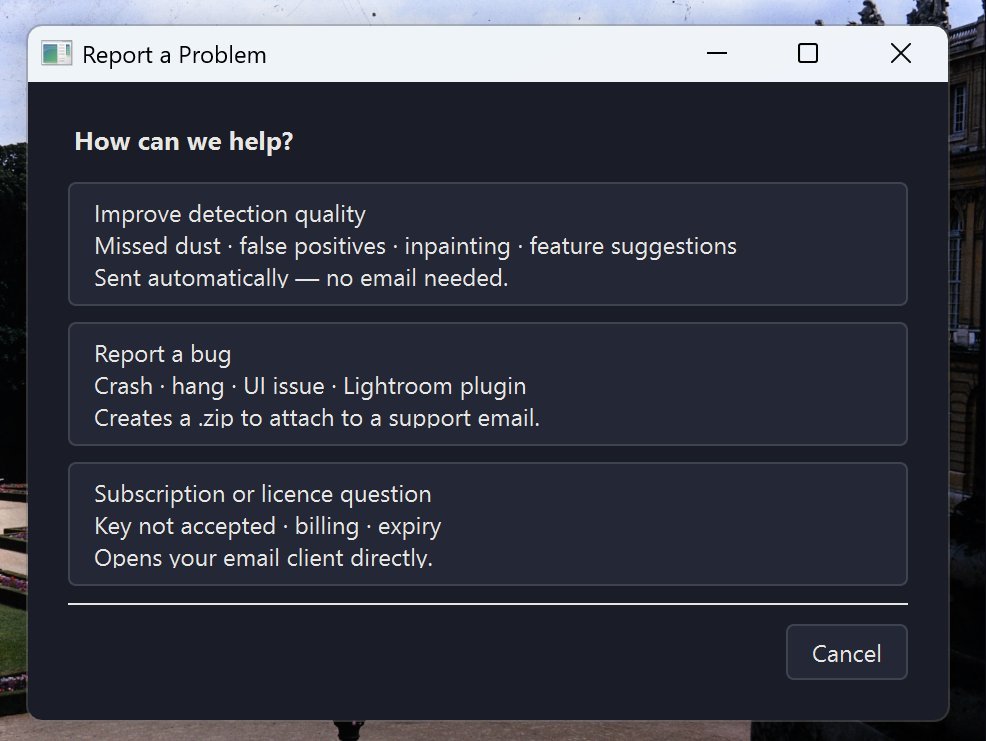
Open Help → Report a Problem. The “Improve detection quality” option sends a quick automatic report (no email needed). For bugs, “Report a bug” creates a zip you can email to support.
Next Steps
- Settings reference — 2.3: All Settings Explained.
- Advanced controls — 5.1: Advanced Settings Configuration.