DustMagic ships with a bundled Lightroom Classic plugin. Once installed, you can send photos to DustMagic from inside Lightroom and get cleaned versions back as new copies.
One-Time Setup
- In DustMagic, open Help → Lightroom Integration…
- If Lightroom Classic is detected, click Install Plugin.
- Restart Lightroom.
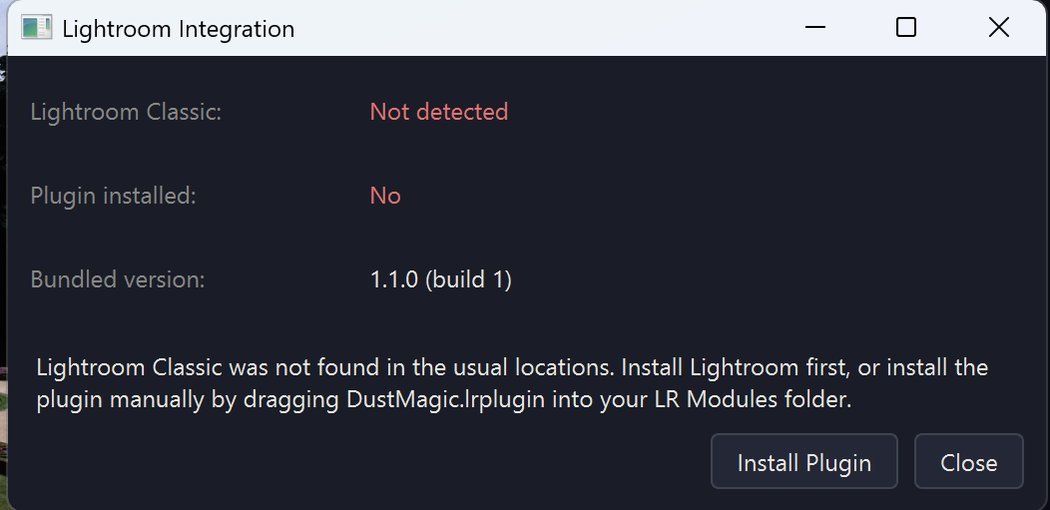
If Lightroom Classic isn’t detected, install Lightroom first or drag DustMagic.lrplugin into your Lightroom Modules folder manually.
Sending a Photo to DustMagic
- In Lightroom Library or Develop, select one or more photos.
- Go to File → Plug-in Extras → Edit in DustMagic (or right-click → Plug-in Extras).
- Lightroom hands the file off to DustMagic, which opens with the photo loaded.
- Detection runs automatically. Adjust if needed, then process.
- The cleaned file is returned to your Lightroom catalog as a new copy alongside the original.
Sending a Folder for Batch
- Select multiple photos in Lightroom and use the same Plug-in Extras action — DustMagic loads them as a batch.
- Use the Conservative profile, choose dark or light dust, and click Process Batch as normal.
- Cleaned versions return to Lightroom together.
Tips
- Send TIFFs, not JPEGs — DustMagic preserves dynamic range better with TIFFs.
- Run dust removal before color grading so your edits are made on a clean image.
- Keep originals — Lightroom’s stack lets you collapse the original and cleaned copy together.
Troubleshooting
- Plugin doesn’t appear in Lightroom — restart Lightroom; verify
DustMagic.lrpluginis listed in File → Plug-in Manager. - Lightroom not detected — install Lightroom Classic, then re-open the dialog. Standalone (Cloud) Lightroom is not supported.
- Returned file isn’t visible — Lightroom usually places it in the same folder as the original; make sure the folder is in your catalog.
Next Steps
- Working in Photoshop or another editor — 3.2: Photoshop & Other Editors.
- Where DustMagic saves cleaned files — 3.3: Exporting & Saving Cleaned Images.